Support your child's preparation for the CREST Cyber Olympiad (CCO) with expertly crafted sample papers for Grade 4. These free PDF downloads, complete with detailed solutions, are designed to build a strong foundation in cyber and computer science concepts.
Benefits of Practising CREST Cyber Olympiad Sample Papers for Grade 4 Gain a clear understanding of the exam format and question styles. Enhance problem-solving speed and accuracy with consistent practice. Identify strengths and areas that need improvement before the exam. Download Grade 4 CREST Cyber Olympiad Sample Paper (PDF) Download the CREST Cyber Olympiad sample paper for Grade 4 in PDF format to help your child prepare effectively and boost their confidence for the exam.
>> Join CREST Olympiads WhatsApp Channel for latest updates. Sample PDF of CREST Cyber Olympiad for Class 4:
If your web browser doesn't have a PDF Plugin. Instead you can Click here to download the PDF
Syllabus:
Section 1: Computer & IT
Computers
Hardware and Software
Operating System
Input and Output Devices
Primary and Secondary Memory
Bits, Bytes and Memory Size; RAM/ROM, Solid State Drive (SSD), Hard Disk Drive (HDD)
Keyboard
Function Keys
Shortcut Keys with Windows, CTRL, ALT, SHIFT, Function Keys
GUI Operating System and Desktop Management
Search Bar and Cortana
Settings: Date & Time, Languages, Display
Shortcut Icons and Creating Desktop Shortcuts
Context Menu: Display Settings, Personalization, Properties
Taskbar Settings, File Explorer, Notifications
RUN Dialog Box
Basics of Troubleshooting
Identify the Problem
Restart and Refresh
Word Processing / MS Word
Tab Menu: Home, Insert, Draw, Design
Find & Replace
Indents, Tabs & Line Spacing
Lists & Their Types
Inserting Images
Hyperlink
Introduction to Presentation Tool / MS PowerPoint
Slides: Add, Edit and Organize
Tab Menu: Home, Insert, Draw, Design (Themes)
Text Box and Editing
Adding and Editing Images and Shapes
Resize Tool
File Management
Types of Files & Folders with Extensions:
Text (.txt, .docx, .pdf),
Images (.jpg/.jpeg, .png, .gif),
Audio (.mp3),
Video (.mp4),
Presentations (.pptx)
Recycle Bin: Restore Files, Permanent Delete
Shortcut Keys: Cut, Copy, Paste, Undo, Redo
File Explorer
Internet – Web Browsers
WWW, Web Browsers, Search Engines: Google, Bing, Yahoo!
MS Paint (Advanced Tools: Colour Picker, Remove Background, Selection Tools)
Using View Tab: Ruler and Gridlines
Using Shift Key with Shapes, Line, Curve
Sample Paper
Previous Year Paper
Marking Scheme
Sample Questions
Q.1
Which of the following statements is incorrect regarding computer hardware?
a) Functionality of a computer depends on RAM capacity
b) Computer peripherals are the programmable parts of computer
c) A video camera is the most commonly used input device for capturing video data
d) Data in hard disk drive is not lost if the power is disconnected
Q.2
How can you access the context menu for a file or folder?
a) Press F2 on the file
b) Left-click the file or folder
c) Double-click the file
d) Right-click the file or folder
Q.3
To draw a circle without boundary, what should you do?
a) Set the shape Outline style to no Outline
b) Set the shape Outline to solid color
c) Use the same Color 1 and Color 2
d) Set the background
Q.4
What is the function of Ctrl + B in MS Word?
a) It converts selected text, into the next larger size of the same font
b) It makes the selected text Bold
c) It adds a line break to the document
d) It applies underline formatting the selected text
Q.5
Logan has finished his slide, but he wants to move it to the end. How can he do this quickly?
a) Press delete and add it again
b) Copy and paste the slide
c) Change the background colour
d) Drag it to the end of the slide list
Q.6
You notice your web browser has many tabs open and is running slowly. What can you do?
a) Close unused tabs
b) Organise the tabs
c) Open more tabs
d) Switch to a new search engine
Q.7
What is the shortcut key combination to insert a hyperlink in an MS Word document?
a) Ctrl + K
b) Ctrl + Shift + K
c) Alt + K
d) MS Word does not support hyperlinks
Q.8
Which option allows you to automatically hide the taskbar when not in use so that you use the whole display?
a) Taskbar Settings
b) Personalization
c) Display settings
d) Task View Settings
Q.9
What would happen if a GPS device couldn't connect to any satellites?
a) It would overheat
b) It would stop showing location
c) It would give wrong temperature
d) It would show wrong time
Q.10
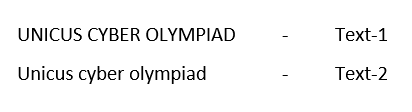
Which of the following change case option is applied to Text-1 to convert it to Text-2 as shown in the given snapshot in MS-Word 2010?
a) Lowercase
b) Uppercase
c) Toggle case
d) Sentence case
Your Score: 0 /10
Answers to Sample Questions from CREST Olympiads:
Q.1 b Q.2 d Q.3 a Q.4 b Q.5 d Q.6 a Q.7 a Q.8 a Q.9 b Q.10 d
Answers to Sample Questions from CREST Olympiads:
Q.1 : b | Q.2 : d | Q.3 : a | Q.4 : b | Q.5 : d | Q.6 : a | Q.7 : a | Q.8 : a | Q.9 : b | Q.10 : d